Build package
Build Fourier N1
Fourier (Fourier Intelligence) · Humanoid · active · 2025
1.3 m, 38 kg humanoid launched April 2025 with open-released BOM, design drawings, assembly guides and base software.
Build is partial: The hardware pack (EBOM, SolidWorks CAD, assembly guide, videos) is only on Baidu Netdisk behind a login, and carries no hardware license, so it is study-only. No part prices or purchase channel for FSA actuators.
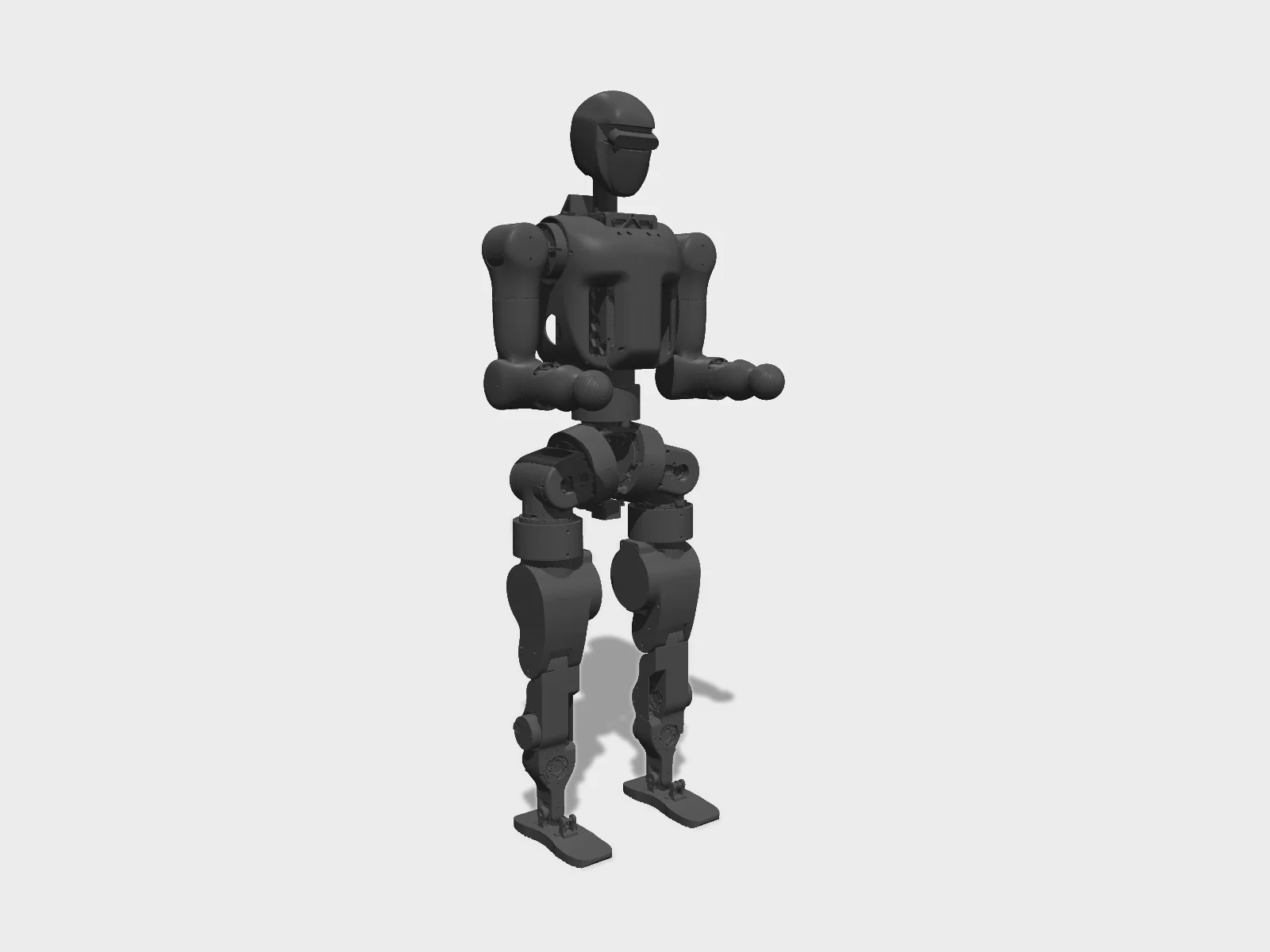
- Drawing
- /fourier/n1
- Maker
- Fourier (Fourier Intelligence)
- Country
- Shanghai, CN
- Package rev
- v0.1.0
- Level
- L2 Sim-verified
- Availability
- Buy
- Openness
- 85/100
- HW licence
- unknown
- Last checked
- 2026-09-25
- Height
- 130 cm
- Mass
- 38 kg
- DOF
- 23
- Actuators
- Fourier FSA actuators; URDF effort limits 95 N·m x4, 54 N·m x7, 30 N·m x12
The 23 DOF count excludes hands. The open-source package is published as the docs repo FFTAI/fourier-grx-N1 (MIT); there is no FFTAI/N1 repo. Press (Yicai, TMTPost) called it the first open-source humanoid; that claim is disputed. The MIT license covers the docs repo; no license for the hardware files was found, so hw is left undeclared. The N1 URDF (Wiki-GRx-Models, FourierN1 branch) sets a 95 N·m max effort on the four strongest joints; launch press said 96 N·m peak. Walking policies (TorchScript policy_jit_walk.pt) ship in Wiki-GRx-Deploy (FourierN1 branch) with Isaac Gym training (Wiki-GRx-Gym) and MuJoCo sim2sim (Wiki-GRx-Mujoco). fourier-grx itself is a closed binary.
Configure
Saved in the URL. Share the link to share the build.Source
One cart across 0 vendors · prices in USD as listed13 lines · 33 parts · 13 without an offer in US · 0/13 lines sourced in 2+ regions (L3 gate)
| # | Part | Category | Qty | Unit | Line | Offer |
|---|---|---|---|---|---|---|
No offer in this region13 lines · unpriced | ||||||
| 1 | Fourier FSA actuator, 95 N·m URDF effort class (hip pitch x2, knee pitch x2); 48 V, Ethernet actuator.fsa-95nm · 1 alt | actuator | 4 | unpriced | — | Offers in CN only |
| 2 | Fourier FSA actuator, 54 N·m URDF effort class (hip roll x2, hip yaw x2, waist yaw, shoulder pitch x2); 48 V, Ethernet actuator.fsa-54nm · 1 alt | actuator | 7 | unpriced | — | Offers in CN only |
| 3 | Fourier FSA actuator, 30 N·m URDF effort class (ankle roll/pitch x4 via linkages, shoulder roll/yaw x4, elbow x2, wrist yaw x2); 48 V, Ethernet actuator.fsa-30nm · 1 alt | actuator | 12 | unpriced | — | Offers in CN only |
| 4 | USB IMU (serial, /dev/ttyUSB0, 500 Hz in config), mounted on the hip IMU plate (T5M-05-019) sensor.imu · 1 alt | sensor | 1 | unpriced | — | Offers in CN only |
| 5 | Head camera (camera_link in URDF; camera bracket drawing T5M-01-02). Model not stated sensor.head-camera | sensor | 1 | unpriced | — | No offer found yet |
| 6 | Main control computer (x86-64, Ubuntu 22.04, HDMI + USB, Wi-Fi hotspot, wired 192.168.137.220). Model not stated compute.main | compute | 1 | unpriced | — | Offers in CN only |
| 7 | Rear plug-in battery pack with its own power/charge button and in-box fuse (CAD: Battery-huaqing-20241127.SLDPRT, T5M电池.SLDASM). Voltage/capacity not in readable sources power.battery | power | 1 | unpriced | — | Offers in CN only |
| 8 | Battery charger (red/blue LED = charging, green = full) power.charger | power | 1 | unpriced | — | Offers in CN only |
| 9 | Emergency-stop button (急停), on its own bracket in the chest (T5M-02-28/30) electronics.estop | electronics | 1 | unpriced | — | No offer found yet |
| 10 | Whole-robot power button with status LED (short press = release mode, 3 s long press = debug mode) electronics.power-switch | electronics | 1 | unpriced | — | No offer found yet |
| 11 | Fourier internal boards (CAD models GR1-02-PCB_100/200/300, GR2-BAT-CON-PCB02/04, GR2-BAT-EM-PCB): power distribution / battery control. Count and function per board not documented electronics.pcbs | electronics | 1 | unpriced | — | Offers in CN only |
| 12 | USB gamepad, XBOX layout (ships with one of two models; PS4/PS5 also supported in config) other.joystick | other | 1 | unpriced | — | No offer found yet |
| 13 | Zero-position locating pins (插销) inserted into joint locating holes for TASK_SET_HOME. Count not stated other.calibration-pins | other | 1 | unpriced | — | No offer found yet |
| Cart total · US | 33 | $0.00 | 13 lines unpriced, not in total | |||
Fabricate
Planned for a 256 mm bed- Fabricated parts
- 100
- Print time (sum)
- —
- Material (sum)
- —
- Plates · estimate
- —
No plate estimate: the package does not list grams per part yet, and we will not guess them. Slice the source files for your 256 mm bed.
| Part | Process | Material | Qty | h / part | g / part | Profile |
|---|---|---|---|---|---|---|
Head (T5M-01): head upper shell, head, camera bracket. Head also shipped as a 129 MB STL cnc.head | CNC | Not read (EBOM/drawings need a Baidu login). Launch press: body is aluminium alloy + engineering plastic composite; process per part unverified | 3 | — | — | source |
Torso / battery bay (T5M-02 + T5-02 + misc): battery shell, battery latch, dust meshes (3 variants), light pipes, chest, chest front shell, power insulation plate, key and e-stop brackets cnc.torso | CNC | Not read (EBOM/drawings need a Baidu login). Launch press: body is aluminium alloy + engineering plastic composite; process per part unverified | 18 | — | — | source |
Left arm (T5M-03): J2 mount-L, upper arm-L, elbow-L cnc.arm-left | CNC | Not read (EBOM/drawings need a Baidu login). Launch press: body is aluminium alloy + engineering plastic composite; process per part unverified | 3 | — | — | source |
Right arm and shared arm parts (T5M-04): J1 mount, bearing seat, J2 mount-R, J5 mount-LR, shoulder-R, upper arm-R, elbow-R, forearm-LR, cover, ball hand, harness clamp, lifting eye cnc.arm-right-shared | CNC | Not read (EBOM/drawings need a Baidu login). Launch press: body is aluminium alloy + engineering plastic composite; process per part unverified | 12 | — | — | source |
Waist and pelvis (T5M-05): hip front/rear frames, waist frame, waist '60' output flange, waist-hip clamp, cable sliders/clamps/cover plates, hip '80' heat-sink cover, hip IMU plate cnc.waist-hip | CNC | Not read (EBOM/drawings need a Baidu login). Launch press: body is aluminium alloy + engineering plastic composite; process per part unverified | 19 | — | — | source |
Right leg and shared knee parts (T5M-06): hip-yaw front support-R, right thigh, '6043E' output flange, thigh motor plate, knee linkage/crank/shafts/pins/cover, right shank, right sole support, right foot cnc.leg-right-shared | CNC | Not read (EBOM/drawings need a Baidu login). Launch press: body is aluminium alloy + engineering plastic composite; process per part unverified | 22 | — | — | source |
Left leg, hip-yaw housing and ankle linkage (T5M-07): hip-yaw supports, hip-roll limit, custom hip-yaw motor shell, left thigh, left shank, sole support, left foot, ankle upper/lower cranks, long/short rods, rod shaft cnc.leg-left-ankle | CNC | Not read (EBOM/drawings need a Baidu login). Launch press: body is aluminium alloy + engineering plastic composite; process per part unverified | 16 | — | — | source |
Ankle small parts (T5C-07): 45/60 linkage output pins, short-rod shafts, ankle cross shaft, spherical-bearing ring cnc.ankle-small | CNC | Not read (EBOM/drawings need a Baidu login). Launch press: body is aluminium alloy + engineering plastic composite; process per part unverified | 6 | — | — | source |
Hip-yaw zero-calibration tool (T5M-09-001) cnc.tool-hip-zero | CNC | Not read (EBOM/drawings need a Baidu login). Launch press: body is aluminium alloy + engineering plastic composite; process per part unverified | 1 | — | — | source |
Assemble
Every step ends in a check- Steps
- 12
- Subassemblies
- 11
- Hands-on time (sum)
- —
- Critical path
- —
- Your progress · this device
- —
12 steps have no time estimate; times above are lower bounds.
Steps, in build order
- Fabrication01
Get the hardware pack and make the drawn parts
Download 'Fourier-N1开源资料' from the official Baidu Netdisk share (code cedk; about 5.6 GB, needs a Baidu account). Read Ebom-Fourier N1-V1.3.1.xlsx for per-robot quantities, materials and purchased parts, then make each part from its SolidWorks drawing (.SLDDRW) in FourierN1模型总装/. Only two parts also ship as PDF + STEP (T5M-02-01 battery shell, T5M-02-30 e-stop plate bracket); the rest need SolidWorks to open or export.
CHECKAll 100 drawn part designs are accounted for against the EBOM (V1.3.1), with the per-robot quantity from the EBOM made or sourced for each.- Parts in
- Head (T5M-01): head upper shell, head, camera bracket. Head also shipped as a 129 MB STLcnc.head
- Torso / battery bay (T5M-02 + T5-02 + misc): battery shell, battery latch, dust meshes (3 variants), light pipes, chest, chest front shell, power insulation plate, key and e-stop bracketscnc.torso
- Left arm (T5M-03): J2 mount-L, upper arm-L, elbow-Lcnc.arm-left
- Right arm and shared arm parts (T5M-04): J1 mount, bearing seat, J2 mount-R, J5 mount-LR, shoulder-R, upper arm-R, elbow-R, forearm-LR, cover, ball hand, harness clamp, lifting eyecnc.arm-right-shared
- Waist and pelvis (T5M-05): hip front/rear frames, waist frame, waist '60' output flange, waist-hip clamp, cable sliders/clamps/cover plates, hip '80' heat-sink cover, hip IMU platecnc.waist-hip
- Right leg and shared knee parts (T5M-06): hip-yaw front support-R, right thigh, '6043E' output flange, thigh motor plate, knee linkage/crank/shafts/pins/cover, right shank, right sole support, right footcnc.leg-right-shared
- Left leg, hip-yaw housing and ankle linkage (T5M-07): hip-yaw supports, hip-roll limit, custom hip-yaw motor shell, left thigh, left shank, sole support, left foot, ankle upper/lower cranks, long/short rods, rod shaftcnc.leg-left-ankle
- Ankle small parts (T5C-07): 45/60 linkage output pins, short-rod shafts, ankle cross shaft, spherical-bearing ringcnc.ankle-small
- Hip-yaw zero-calibration tool (T5M-09-001)cnc.tool-hip-zero
- Tools
- —
- Torque
- —
- Time
- —
- After
- Start
- Source
- pan.baidu.com
- Legs02
Assemble the lower limbs (thigh, knee linkage, shank, ankle linkage, foot)
Follow video 1 (下肢装配, 1.57 GB) and the matching chapter of FourierN1装配工艺指导书_A01.pdf. Knee pitch is driven through a linkage (knee link, output crank, link shafts); both ankle joints are driven from the shank through long/short rods and a cross shaft. Mirror parts: T5M-06-xxx right, T5M-07-xxx left. Fastener torques are only in the (unread) PDF guide.
CHECKBy hand, unpowered, each assembled leg moves without binding over the URDF ranges: knee -0.087 to 2.356 rad, ankle pitch ±0.785 rad, ankle roll ±0.436 rad.- Parts in
- Right leg and shared knee parts (T5M-06): hip-yaw front support-R, right thigh, '6043E' output flange, thigh motor plate, knee linkage/crank/shafts/pins/cover, right shank, right sole support, right footcnc.leg-right-shared
- Left leg, hip-yaw housing and ankle linkage (T5M-07): hip-yaw supports, hip-roll limit, custom hip-yaw motor shell, left thigh, left shank, sole support, left foot, ankle upper/lower cranks, long/short rods, rod shaftcnc.leg-left-ankle
- Ankle small parts (T5C-07): 45/60 linkage output pins, short-rod shafts, ankle cross shaft, spherical-bearing ringcnc.ankle-small
- Fourier FSA actuator, 95 N·m URDF effort class (hip pitch x2, knee pitch x2); 48 V, Ethernetactuator.fsa-95nm
- Fourier FSA actuator, 30 N·m URDF effort class (ankle roll/pitch x4 via linkages, shoulder roll/yaw x4, elbow x2, wrist yaw x2); 48 V, Ethernetactuator.fsa-30nm
- Tools
- —
- Torque
- —
- Time
- —
- After
- 01
- Source
- pan.baidu.com
- Arms03
Assemble the arms
Follow video 2 (上肢装配) and the PDF guide. Each arm has 5 joints: shoulder pitch (54 N·m class), shoulder roll, shoulder yaw, elbow pitch, wrist yaw (30 N·m class). The J1/J2/J5 mounts, upper arm, elbow and forearm are drawn parts; the end effector is a fixed ball hand (T5M-04-011).
CHECKBy hand, each arm reaches the URDF ranges without binding: shoulder pitch ±2.966 rad, elbow -0.349 to 1.658 rad, shoulder yaw and wrist yaw ±1.832 rad.- Parts in
- Left arm (T5M-03): J2 mount-L, upper arm-L, elbow-Lcnc.arm-left
- Right arm and shared arm parts (T5M-04): J1 mount, bearing seat, J2 mount-R, J5 mount-LR, shoulder-R, upper arm-R, elbow-R, forearm-LR, cover, ball hand, harness clamp, lifting eyecnc.arm-right-shared
- Fourier FSA actuator, 54 N·m URDF effort class (hip roll x2, hip yaw x2, waist yaw, shoulder pitch x2); 48 V, Ethernetactuator.fsa-54nm
- Fourier FSA actuator, 30 N·m URDF effort class (ankle roll/pitch x4 via linkages, shoulder roll/yaw x4, elbow x2, wrist yaw x2); 48 V, Ethernetactuator.fsa-30nm
- Tools
- —
- Torque
- —
- Time
- —
- After
- 01
- Source
- pan.baidu.com
- Torso and head04
Assemble the torso, battery bay and head
Follow video 3 (躯干及头部装配). The chest carries the battery bay (battery shell, latch, dust mesh, light pipes), the power insulation plate, the power key and the e-stop brackets; the head carries the camera bracket.
CHECKThe e-stop latches and releases, the power button is reachable from outside the shell, and the battery bay is empty and unobstructed for the latch to engage.- Parts in
- Torso / battery bay (T5M-02 + T5-02 + misc): battery shell, battery latch, dust meshes (3 variants), light pipes, chest, chest front shell, power insulation plate, key and e-stop bracketscnc.torso
- Head (T5M-01): head upper shell, head, camera bracket. Head also shipped as a 129 MB STLcnc.head
- Head camera (camera_link in URDF; camera bracket drawing T5M-01-02). Model not statedsensor.head-camera
- Main control computer (x86-64, Ubuntu 22.04, HDMI + USB, Wi-Fi hotspot, wired 192.168.137.220). Model not statedcompute.main
- Emergency-stop button (急停), on its own bracket in the chest (T5M-02-28/30)electronics.estop
- Whole-robot power button with status LED (short press = release mode, 3 s long press = debug mode)electronics.power-switch
- Fourier internal boards (CAD models GR1-02-PCB_100/200/300, GR2-BAT-CON-PCB02/04, GR2-BAT-EM-PCB): power distribution / battery control. Count and function per board not documentedelectronics.pcbs
- Tools
- —
- Torque
- —
- Time
- —
- After
- 01
- Source
- pan.baidu.com
- Waist and hip05
Assemble the waist and hip (pelvis, waist yaw, hip roll/yaw) and mount the IMU
Follow video 4 (腰胯装配, 0.92 GB). The pelvis frames carry the hip actuators; hip yaw uses a customised actuator housing (T5M-07-004/005) and a front/rear support; waist yaw drives through the '60' output flange. The IMU goes on the hip IMU plate (T5M-05-019) and its USB lead runs to the main computer.
CHECKWaist yaw turns ±2.617 rad by hand without cable pull; hip yaw turns ±2.617 rad; hip roll stops at its limit block (T5M-07-003).- Parts in
- Waist and pelvis (T5M-05): hip front/rear frames, waist frame, waist '60' output flange, waist-hip clamp, cable sliders/clamps/cover plates, hip '80' heat-sink cover, hip IMU platecnc.waist-hip
- Left leg, hip-yaw housing and ankle linkage (T5M-07): hip-yaw supports, hip-roll limit, custom hip-yaw motor shell, left thigh, left shank, sole support, left foot, ankle upper/lower cranks, long/short rods, rod shaftcnc.leg-left-ankle
- Fourier FSA actuator, 95 N·m URDF effort class (hip pitch x2, knee pitch x2); 48 V, Ethernetactuator.fsa-95nm
- Fourier FSA actuator, 54 N·m URDF effort class (hip roll x2, hip yaw x2, waist yaw, shoulder pitch x2); 48 V, Ethernetactuator.fsa-54nm
- USB IMU (serial, /dev/ttyUSB0, 500 Hz in config), mounted on the hip IMU plate (T5M-05-019)sensor.imu
- Tools
- —
- Torque
- —
- Time
- —
- After
- 01
- Source
- pan.baidu.com
- Final assembly06
Final assembly and harness
Safety · human-verified requiredFollow video 5 (总装): join legs, pelvis, torso, arms and head; route the 48 V power and Ethernet harness through the cable sliders and clamp plates to every actuator. Each actuator has a fixed IP (legs .50-.55 / .70-.75, waist .90, arms .10-.14 / .30-.34 on 192.168.137.x). Fit the battery last.
CHECKBefore inserting the battery: no bare conductors at any slider or clamp, and every joint still moves through its range with the harness attached (no cable pull). Battery latch engages with the button up (off).This step can hurt a person or ruin parts. Its instructions need sign-off by a human who has done it before relying on them. Stop and ask if anything differs from what you see.
- Parts in
- Torso / battery bay (T5M-02 + T5-02 + misc): battery shell, battery latch, dust meshes (3 variants), light pipes, chest, chest front shell, power insulation plate, key and e-stop bracketscnc.torso
- Waist and pelvis (T5M-05): hip front/rear frames, waist frame, waist '60' output flange, waist-hip clamp, cable sliders/clamps/cover plates, hip '80' heat-sink cover, hip IMU platecnc.waist-hip
- Rear plug-in battery pack with its own power/charge button and in-box fuse (CAD: Battery-huaqing-20241127.SLDPRT, T5M电池.SLDASM). Voltage/capacity not in readable sourcespower.battery
- Fourier internal boards (CAD models GR1-02-PCB_100/200/300, GR2-BAT-CON-PCB02/04, GR2-BAT-EM-PCB): power distribution / battery control. Count and function per board not documentedelectronics.pcbs
- Tools
- —
- Torque
- —
- Time
- —
- Source
- pan.baidu.com
- Electrical bring-up07
First power-on and self-check
Safety · human-verified requiredWith the robot on a hoist: press the battery button (blue LED), make sure the e-stop is released, then hold the power button 3 s for debug mode (purple slow blink). Video 6 (测试) shows the factory test. If charging fails, check that the battery button is pressed and the fuse inside the battery box.
CHECKBattery LED solid blue, power-button LED purple slow blink, and all 23 actuator LEDs purple slow blink (normal). The main computer boots to the desktop or answers ssh on 192.168.137.220.This step can hurt a person or ruin parts. Its instructions need sign-off by a human who has done it before relying on them. Stop and ask if anything differs from what you see.
- Parts in
- Rear plug-in battery pack with its own power/charge button and in-box fuse (CAD: Battery-huaqing-20241127.SLDPRT, T5M电池.SLDASM). Voltage/capacity not in readable sourcespower.battery
- Battery charger (red/blue LED = charging, green = full)power.charger
- Emergency-stop button (急停), on its own bracket in the chest (T5M-02-28/30)electronics.estop
- Whole-robot power button with status LED (short press = release mode, 3 s long press = debug mode)electronics.power-switch
- Main control computer (x86-64, Ubuntu 22.04, HDMI + USB, Wi-Fi hotspot, wired 192.168.137.220). Model not statedcompute.main
- Tools
- —
- Torque
- —
- Time
- —
- After
- 06
- Source
- github.com
- Firmware08
Install fourier-grx and configure the robot as N1
On the main computer: `sudo dpkg -i fourier-grx-<ver>.deb`, then `fourier-grx install` and choose model N1 (reconfigure with `fourier-grx config`, inspect with `fourier-grx list`). Installation switches the wired port to a static IP. Use 4.1.21 (stable, supported) or 4.2.2 (preview). From 4.0.0 on, developer-API units are radians.
CHECK`fourier-grx list` shows robot N1, and `fourier-grx start` passes actuator self-check (no 'cannot access actuator IP' errors) and IMU initialization (no 'IMU not found').- Parts in
- Main control computer (x86-64, Ubuntu 22.04, HDMI + USB, Wi-Fi hotspot, wired 192.168.137.220). Model not statedcompute.main
- USB IMU (serial, /dev/ttyUSB0, 500 Hz in config), mounted on the hip IMU plate (T5M-05-019)sensor.imu
- Tools
- —
- Torque
- —
- Time
- —
- After
- 07
- Source
- github.com
- Calibration09
Zero-position calibration (TASK_SET_HOME, TID 999)
Safety · human-verified requiredInsert the locating pins into every joint locating hole (hip-yaw zero tool T5M-09-001 is in the drawings). Run `fourier-grx start`, select the calibration task with L1 and confirm with L2. Then remove every pin; a forgotten pin means recalibrating.
CHECKThe terminal prints an all-zero array; any value above 1 means more than 1° of joint offset and calibration must be repeated. All pins are removed afterwards.This step can hurt a person or ruin parts. Its instructions need sign-off by a human who has done it before relying on them. Stop and ask if anything differs from what you see.
- Parts in
- Zero-position locating pins (插销) inserted into joint locating holes for TASK_SET_HOME. Count not statedother.calibration-pins
- Hip-yaw zero-calibration tool (T5M-09-001)cnc.tool-hip-zero
- USB gamepad, XBOX layout (ships with one of two models; PS4/PS5 also supported in config)other.joystick
- Tools
- —
- Torque
- —
- Time
- —
- After
- 08
- Source
- github.com
- First motion10
First motion on the hoist: read state, then ready pose
Safety · human-verified requiredRun Wiki-GRx-Deploy (FourierN1 branch) developer_radian/demo_print_state.py, then demo_ready_state.py, or press A on the gamepad in debug mode. Ready state enables all actuators, bends the knees slightly and locks the joints. The gamepad logo key is the software e-stop: it disables all joints and the robot goes limp.
CHECKdemo_print_state prints live IMU and joint position/velocity/effort for all 23 joints in joint_sequence order, and in ready state the robot holds pose on the hoist with no joint error codes.This step can hurt a person or ruin parts. Its instructions need sign-off by a human who has done it before relying on them. Stop and ask if anything differs from what you see.
- Parts in
- USB gamepad, XBOX layout (ships with one of two models; PS4/PS5 also supported in config)other.joystick
- Emergency-stop button (急停), on its own bracket in the chest (T5M-02-28/30)electronics.estop
- Tools
- —
- Torque
- —
- Time
- —
- After
- 09
- Source
- github.com
- 11
Lower to the ground and walk
Safety · human-verified requiredFrom ready state, lower the robot to the ground and press Y (walk; stand and walk blend with stick input) or B (run). Double-tap is required from 4.1.11. Keep a spotter on the hoist line and your hand on the logo key.
CHECKThe robot stands unassisted, steps in place with the stick centred, and follows forward/turn stick commands for at least a few metres without falling.This step can hurt a person or ruin parts. Its instructions need sign-off by a human who has done it before relying on them. Stop and ask if anything differs from what you see.
- Parts in
- USB gamepad, XBOX layout (ships with one of two models; PS4/PS5 also supported in config)other.joystick
- Tools
- —
- Torque
- —
- Time
- —
- After
- 10
- Source
- github.com
- Sim and policy12
Train, sim2sim-check and deploy a walking policy
Safety · human-verified requiredTrain in Isaac Gym with Wiki-GRx-Gym (FourierN1 branch, envs/n1), check the exported TorchScript in MuJoCo with Wiki-GRx-Mujoco (FourierN1 branch, robots/N1), then run it on the robot with Wiki-GRx-Deploy developer_radian/demo_walk.py. Keep the repos' joint friction/armature/stiffness/damping/noise settings; the IMU input order is quat x,y,z,w.
CHECKThe policy walks in MuJoCo (scene.xml) first; on hardware (on the hoist first) demo_walk.py produces symmetric stepping with no joint thrashing, which the sim2real doc says is the symptom of wrong input ordering.This step can hurt a person or ruin parts. Its instructions need sign-off by a human who has done it before relying on them. Stop and ask if anything differs from what you see.
- Parts in
- Main control computer (x86-64, Ubuntu 22.04, HDMI + USB, Wi-Fi hotspot, wired 192.168.137.220). Model not statedcompute.main
- Tools
- —
- Torque
- —
- Time
- —
- After
- 11
- Source
- github.com
Progress is stored in this browser only (localStorage). Nothing is sent anywhere.
Bring-up
Flash · calibrate · first policy- A
Flash firmware
TargetsMain computer: fourier-grx (.deb, Ubuntu 22.04 x86-64, Python 3.11; closed binary run.bin, no license), Fourier FSA actuators x23 (FSA v2 protocol over Ethernet, 48 V; actuator firmware not published), USB IMU (serial, 500 Hz)
Repofftai.github.io/fourier-grx-N1
fourier-grx releases are downloaded from Fourier's Tencent COS bucket (links in docs/update.md): 4.1.21 stable (2025-10-30, the only stable build still supported) and 4.2.2 preview (2025-12-16). From 4.0.0 the developer API uses radians: use developer_radian/ in Wiki-GRx-Deploy, not developer/. The FSA SDK (FFTAI/fourier_actuator_sdk) ships only prebuilt libfsav2 binaries plus Python (fi_fsa) examples and has no LICENSE. Default actuator IP is 192.168.137.101 out of the box; N1 joint IPs are listed in docs/reference/joint_sequence.md. On some ARM hosts zenoh stalls, so x86 is recommended.
- B
Calibrate
CalibrationTASK_SET_HOME (TID 999): locating pins in every joint hole, run from the gamepad (L1 select, L2 confirm) or the developer API; pass = all-zero array (any value >1 means >1° offset). Remove all pins afterwards.Log the output. It goes in your build report.
- C
First policy
- Walk (TorchScript, developer API, radians)PyTorch JIT (Isaac Gym / legged_gym) source
- Walk, refined (TorchScript)PyTorch JIT (Isaac Gym / legged_gym, FourierN1_refine branch of Wiki-GRx-Gym) source
- Built-in tasks: stand/walk/run (up to 3.5 m/s), get-up front/back, squat, single-leg stand, lie down, box-carry arm posefourier-grx (closed binary) source
Try the policy in the browser sim before it touches hardware. Keep a hand near the power switch the first time a policy runs on the real robot.
Report your build
Moves Fourier N1 toward L4 · BuiltA build report is the only thing that proves a package works. It raises the level, puts a point on the map, and tells the Foreman which steps to rewrite.
Level gate
Holds L2 · evidence, not confidence- L0Indexed
Known to exist. Atlas page only.
- 8 sources on record(met)
- L1Compiled
Package validates against the spec; every fact has a source.
- Build package compiled(met)
- 31 sources across robot and package(met)
- L2Sim-verified
Loads in browser and GPU sim, mass within tolerance of the BOM, holds a stand. Unlocks .training.
- URDF/MJCF is public(met)
- Sim load, mass tolerance and stand are checked on .training(checked elsewhere)
- L3Sourced
Every BOM line resolves to a live offer in at least two regions. Unlocks the one-click cart.
- 0/13 BOM lines have offers in 2+ regions(not met)
- L4Built
At least one community build report with photos and bring-up logs. Unlocks Build it as the main action.
- 0 reviewed build reports(not met)
- Review feed unreachable at last refresh; count is registry-only(checked elsewhere)
- L5Certified
The robot's maintainer signs the package. Unlocks certified teams and kit sales.
- Maintainer signature not recorded(not met)
Levels are cumulative and set by the registry from reviewed evidence. This panel shows what can be measured from the package today.
Same robot, other verbs
- Know ithumanoidrobots.systems/fourier/n1
- Build itpartialhumanoidrobot.build/fourier/n1The hardware pack (EBOM, SolidWorks CAD, assembly guide, videos) is only on Baidu Netdisk behind a login, and carries no hardware license, so it is study-only. No part prices or purchase channel for FSA actuators.
- Train ithumanoidrobots.training/fourier/n1
- Find its crewhumanoidrobots.team/fourier/n1
- See it on the maphumanoidrobots.earth/fourier/n1